
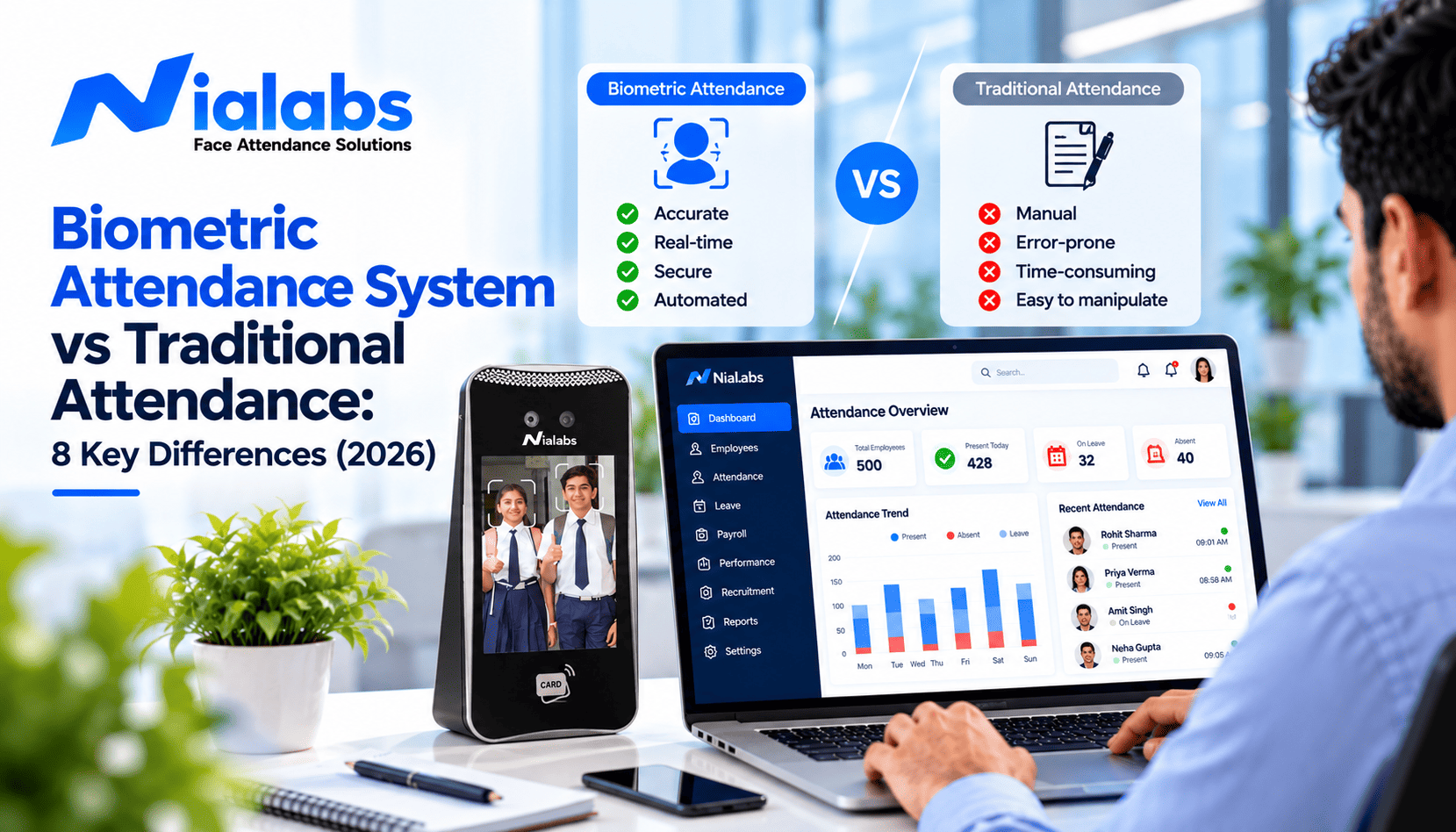
A biometric attendance system is more accurate than traditional attendance because it identifies each person by a fingerprint, face or palm, so nobody can mark attendance for someone else. Traditional methods such as paper registers, sign-in sheets, punch cards and Excel entries depend on people writing or typing records correctly, which leaves room for errors, proxy attendance and delays in payroll. For any organisation beyond a very small single-room team, biometric attendance saves time, cuts disputes and gives payroll data it can trust.
This guide compares the two on 8 factors that matter to Indian schools, offices, factories and hospitals: accuracy, proxy attendance, speed, reporting, payroll integration, record security, cost and scalability. It also covers the real limitations of biometric systems and a step-by-step plan to switch from a manual register.
Key Takeaways
- Traditional attendance relies on human entry, so errors and proxy attendance are built in. Biometric attendance ties each record to a person's fingerprint, face or palm.
- Face recognition with liveness detection blocks photo, video and buddy-punching attempts that a register or ID card cannot stop.
- Biometric punches can flow straight into payroll or an HRMS, removing the monthly step of retyping registers into salary sheets.
- Manual registers look free but carry hidden costs in admin time, salary disputes and payroll errors. Biometric systems cost more upfront and less to run.
- Biometric attendance has limits too: enrolment effort, power and network dependence, field staff and DPDP Act consent. Plan for each before you switch.
Biometric vs Traditional Attendance: Quick Comparison
| Factor | Traditional attendance | Biometric attendance |
|---|---|---|
| 1. Accuracy | Depends on correct writing or typing | Each punch tied to a verified person and timestamp |
| 2. Proxy attendance | Easy to sign or punch for someone else | Blocked; face recognition with liveness also stops photos |
| 3. Speed | Roll calls, queues at the register | One to two seconds per person |
| 4. Reporting | Compiled by hand at month-end | Daily, late-mark and overtime reports generated automatically |
| 5. Payroll and HRMS | Registers retyped into salary sheets | Punches sync directly into payroll or HRMS |
| 6. Record security | Pages lost, damaged or edited | Encrypted, access-controlled, edit history logged |
| 7. Cost | Low upfront, high hidden admin cost | Higher upfront, lower running cost |
| 8. Scalability | Works for one small site | Many branches on one dashboard |
What Is Traditional Attendance?
Traditional attendance is any method where attendance is recorded manually or semi-manually, without verifying who the person is. Common examples in India include:
- Paper attendance registers and muster rolls
- Sign-in and sign-out sheets at the gate or reception
- Punch cards and time clocks
- Roll calls in classrooms, read out by teachers
- Manual entries in Excel or Google Sheets
- ID cards swiped without any biometric check
These methods are simple and familiar, but every one of them trusts a person to write, sign or swipe honestly and accurately. That trust is where most attendance problems begin.
What Is a Biometric Attendance System?
A biometric attendance system records attendance by matching a person's unique physical trait, such as a fingerprint, face, palm or iris, against a template stored during enrolment. When the match succeeds, the system logs the person, time and location automatically.
The main types are fingerprint, face recognition, palm and iris systems, with multi-modal biometric devices combining two methods. Face recognition has become the most popular choice for schools and factories because it is contactless and fast at shift changes. The right type depends on your workforce more than price; our guide on choosing between fingerprint, face, RFID and mobile GPS attendance compares them by use case.
8 Key Differences Between Biometric and Traditional Attendance
1. Accuracy and Reliability
Traditional: every entry depends on someone writing a name, ticking a box or typing a time correctly. Illegible signatures, missed rows and copying errors are routine, and they are rarely caught until payroll is disputed.
Biometric: each record is created by the device at the moment of the punch, tied to a verified identity and an exact timestamp. Nothing is retyped, so there is no transcription error to correct later.
A register records what someone wrote. A biometric system records who was actually there and when.
2. Proxy Attendance and Buddy Punching
Traditional: a colleague can sign the register, a student can answer a roll call for a friend and an ID card can be lent. Stopping this needs constant supervision, which few schools or factories can afford.
Biometric: a fingerprint or face cannot be lent, so buddy punching stops. Face recognition with liveness detection also rejects printed photos, phone screens and videos held up to the camera. For a deeper comparison of methods, see 7 ways to stop proxy attendance, ranked by what works.
3. Time Efficiency
Traditional: roll calls take several minutes of every class, and sign-in registers create queues at factory gates during shift changes. HR then spends hours each month compiling the data.
Biometric: a face or fingerprint punch takes one to two seconds per person, and the record is ready instantly. Teachers start classes on time, and supervisors stop chasing registers.
4. Data Management and Reporting
Traditional: reports are compiled by hand from registers or spreadsheets. Finding one employee's late marks for the last quarter means searching through pages or files.
Biometric: the system generates daily attendance, late arrivals, early exits, overtime and monthly summaries automatically, and exports them for audits or payroll. Missed punches are handled through a regularisation request instead of a correction written in the margin.
5. Payroll, HRMS and ERP Integration
Traditional: attendance has to be retyped into payroll or a school ERP every month. Each retyping step adds errors and delays salary processing.
Biometric: with payroll integration, verified punches flow directly into salary calculations, so late marks, half days and overtime are applied without manual work. Nialabs devices push attendance into payroll HRMS or into other HRMS, ERP and school management software through APIs.
6. Record Security and Compliance
Traditional: paper registers can be lost, damaged or quietly edited, and there is no record of who changed what. That is a problem when a labour inspector or auditor asks for attendance records.
Biometric: records are stored digitally with access controls and an edit history. Whether an electronic record can replace the paper muster roll depends on your state's rules; our guide on biometric attendance and the muster roll covers what an electronic record must do to pass an inspection.
Biometric templates are personal data under the Digital Personal Data Protection Act 2023, and the DPDP Rules 2025 make most obligations enforceable from 13 May 2027. Choose a system that supports consent, biometric data privacy controls, retention limits and deletion. This is general guidance, not legal advice.
7. Cost
Traditional: a register costs almost nothing to buy, but the hidden costs are large: staff time spent marking and compiling attendance, salary paid for hours not worked, and disputes over incorrect deductions.
Biometric: devices and software cost more upfront, but they remove most of that hidden cost every month. For current price ranges by device type, see our biometric attendance price guide for India.
8. Scalability Across Locations
Traditional: registers work for one small site. With several branches, head office waits for each location to send its data and cannot see attendance as it happens.
Biometric: cloud-connected devices at every branch report to one dashboard in real time. Adding a new location means installing a device and enrolling staff, not designing a new process.
Limitations of Biometric Attendance (and How to Handle Them)
Biometric attendance is not problem-free. Knowing its limits helps you plan the rollout properly:
| Limitation | What happens | How to handle it |
|---|---|---|
| Enrolment effort | Every person must be registered before day one | Enrol in batches by department; most staff take under a minute |
| Worn or dirty fingerprints | Fingerprint readers can reject labourers or older staff | Use face recognition, or face plus fingerprint devices |
| Power cuts and weak internet | Punches may not reach the server | Choose devices with offline attendance sync and 4G backup |
| Field and remote staff | They never reach a fixed device | Add mobile selfie attendance with geofencing and liveness |
| Privacy and consent | Biometric data needs DPDP-ready handling | Give clear notice, limit access and set deletion rules |
Which Attendance Method Is Right for You?
| Organisation | Recommended method | Why |
|---|---|---|
| Very small office, under 10 staff, one room | Manual register or simple app can work | Low volume; proxy risk is easy to spot |
| Schools and colleges | Face recognition at entry points | Contactless, fast at peak times, removes roll-call time |
| Factories and plants | Face recognition with offline sync | Shift changes, worn fingerprints, power cuts |
| Offices and IT companies | Face or fingerprint with HRMS integration | Accurate payroll, late marks and leave in one flow |
| Multi-branch businesses | Cloud-connected devices on one dashboard | Real-time view across every site |
| Field sales and service teams | Mobile selfie attendance with geofencing | Staff are rarely at a fixed device |
How to Switch from Manual to Biometric Attendance
- Map your sites and shifts: count entry points, peak punch times and shifts that cross midnight.
- Choose the method by workforce: face recognition for high-volume or hands-on staff, fingerprint for controlled offices, mobile for field teams.
- Plan consent and data rules: tell staff what is collected and why, who can see it and when it is deleted.
- Enrol in batches: one department at a time, with employee IDs that match your payroll or HRMS exactly.
- Run both systems for two weeks: compare biometric records with the register and fix mismatches before switching fully.
- Connect payroll and retire the register: once records match, link attendance to payroll and keep the register only if state rules require it.
Why Nialabs Biometric Attendance
Nialabs designs its own NiaFace attendance terminals and the software behind them. Face recognition attendance uses liveness detection to block photos and videos, works offline during power cuts and syncs automatically when the connection returns, with 4G models for sites without reliable Wi-Fi.
Attendance flows into Nialabs HRMS for payroll with PF, ESI and Professional Tax, or into your existing HRMS, ERP or school software through APIs. Field staff can mark attendance with a liveness-verified selfie in the employee app. You can compare NiaFace face and fingerprint terminals to match each site.
Frequently Asked Questions
Which is better: a biometric attendance system or traditional attendance?
A biometric attendance system is better for most organisations because it verifies each person, prevents proxy attendance, records exact times and connects directly to payroll. Traditional registers can still work for very small single-room teams where every person is known and seen daily.
What are the disadvantages of a manual attendance register?
Manual registers are slow to fill and compile, easy to sign on someone else's behalf, prone to writing and copying errors, hard to search for past records and must be retyped into payroll. Pages can also be lost, damaged or edited without any trace.
Can biometric attendance stop proxy attendance completely?
Biometric attendance stops most proxy attendance because a fingerprint or face cannot be lent to someone else. Face recognition with liveness detection also rejects printed photos, phone screens and videos, which closes the main spoofing routes.
Is biometric attendance expensive for small businesses?
Biometric attendance costs more upfront than a register, but it usually costs less to run because it removes manual compiling, payroll errors and salary disputes. Prices depend on the device type, number of users and software plan.
Does biometric attendance work during power cuts or without internet?
Yes, if the device supports offline mode. Devices with offline attendance sync store punches locally during a power cut or network outage and upload them automatically when the connection returns, so no attendance is lost.
Is biometric attendance legal in India under the DPDP Act?
Yes. Biometric attendance is allowed, but biometric templates are personal data under the DPDP Act 2023. Organisations should give clear notice, collect only what is needed, restrict access, set retention limits and delete data when it is no longer required.
Is a biometric attendance system suitable for schools?
Yes. Schools use face recognition at entry points to mark students and staff in seconds, remove roll-call time and stop proxy attendance. Attendance can also sync with school ERP software and trigger instant notifications to parents.
Conclusion
In the comparison of biometric attendance system vs traditional attendance, the difference comes down to trust. Traditional methods trust people to record attendance correctly; biometric systems verify it. For schools, offices, factories and hospitals in India, that means accurate records, no proxy attendance, faster payroll and records that stand up to an audit.